Register an App to Build on Konstruct
Learn how to register and deploy new applications to your Konstruct platform using our GitOps workflows.
Overview
The Register Application feature allows you to add new application repositories to your platform's GitOps management system. Once registered, your applications will be automatically built on self hosted GitHub runners, published to your Organization's registry, and managed through Argo CD, ensuring consistent and reliable deployments across your clusters.
Before You Begin
To register a new application, you'll need:
- An application Git repository under your Organization's same GitHub org
- Application source code in any language in that repo's
mainbranch Dockerfilethat's able to successfully build and run your repo code on the repository root directory
Registering an Application
Step 1: Open the Registration Dialog
- Navigate to Applications / Services from the main menu
- Click the Register application button in the top-right corner
- The registration modal will appear
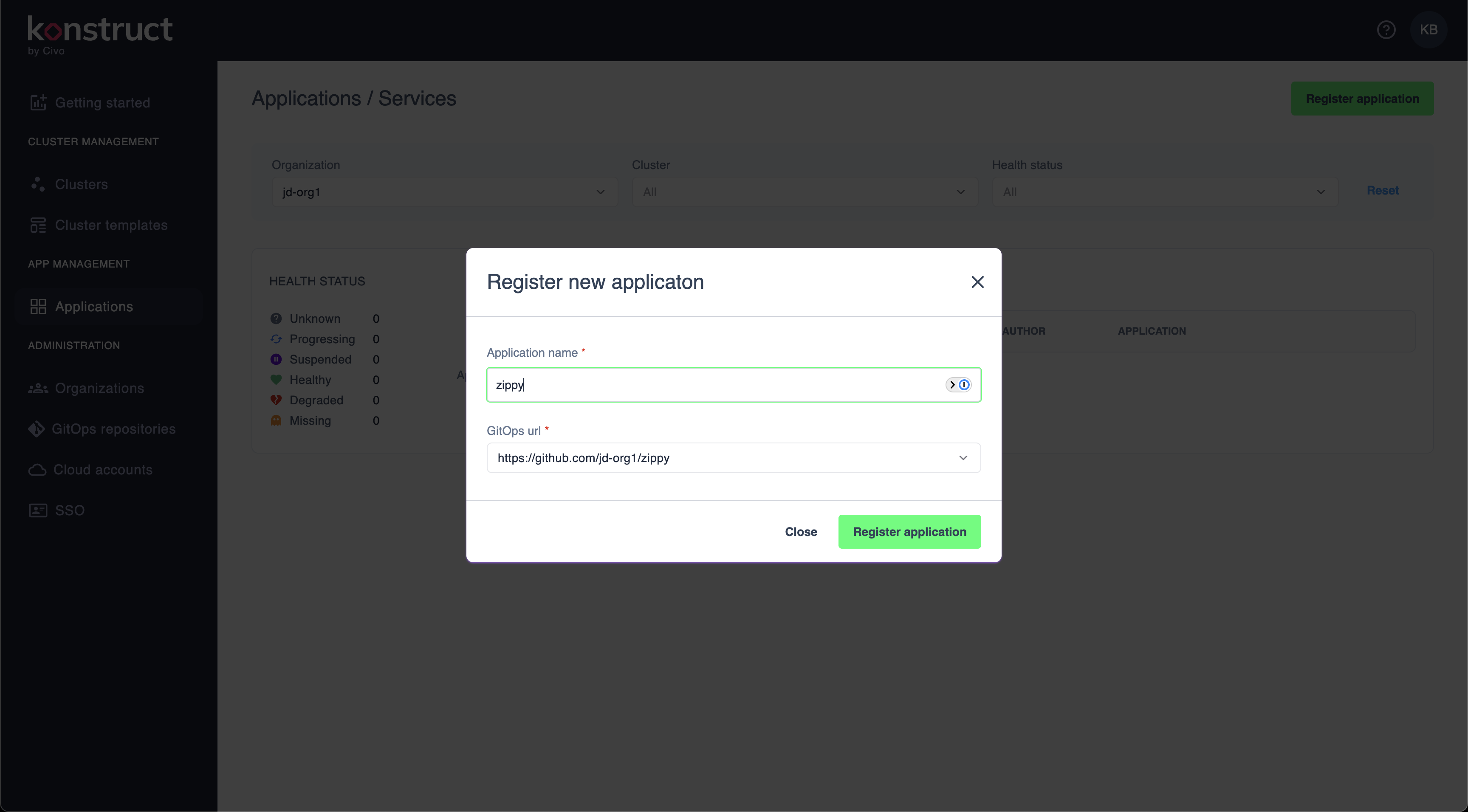
Step 2: Configure Application Details
Fill in the required information:
Application Name
Enter a unique identifier for your application:
zippy
Naming conventions:
- Use lowercase letters, numbers, and hyphens
- Start with a letter
- Keep it short and descriptive
- Avoid special characters or spaces
GitOps URL
Select or enter the Git repository containing your application:
https://github.com/jd-org1/zippy
The dropdown will show:
- Previously configured repositories
- Organization repositories you have access to
- Options to add new repository connections
Step 3: Complete Registration
- Review your application details
- Click Register application to proceed
- Or click Close to cancel without saving
What Happens Next
Once you register an application:
- Argo CD creates the application - Your application is added to Argo CD with the specified configuration
- Initial sync begins - Argo CD fetches your repository and begins deployment
- Resources are created - Kubernetes resources defined in your repository are applied to the cluster
- Health monitoring starts - Continuous monitoring of your application health begins
Application Repository Structure
Your Application git repository should follow the following structure:
your-git-repo/
├── Dockerfile
├── some-source-code.go
├── some-source-code.py
├── some-source-code.cs
└── some-source-code.anything
Once you register your application with Konstruct, a .github and a charts folder will be added as shown here
your-git-repo/
├── .github/workflows/main.yaml
├── charts/
│   ├── templates/
│   └── values.yaml
├── Dockerfile
├── some-source-code.go
├── some-source-code.py
├── some-source-code.cs
└── some-source-code.anything
Application Automation
The main.yaml github action will automatically run any time the main branch receives a commit.
With each revision, the github automation will:
- Build your Dockerfile into a container
- Publish the container to your Organization's image registry in AWS
- Produce a semver release candidate Helm chart for your app
- Publish the helm chart to your Organization's charts registry in AWS
It will also provide the ability to deploy that application version to any Konstruct cluster provisioned in your Organization.
Need help managing your deployments? Reach out to our community.